|
|
Home PIN Login Support Test your pdf document
| Support menu | Overview | Compliance | Page/Font/File Settings | LaTeX Support | MS-Word Support | Upload Help | Copyright Transfer | Compliant Conversion Issues | FAQ |
| TEX/LATEX Related Topics | |||||||||||||||||||
| Are there style files available to use with TeX/LaTeX? |
Please download the following files for document preparation using LaTeX.
Unfortunately, at the present time (and in the foreseeable future),
there is no support for plain TeX or other flavors of TeX (such as AMSTeX, ConTeXt, etc.)
The document root.tex may be configured for US Letter paper or A4. Please note the following important lines:
\documentclass[letterpaper, 10 pt, conference]{ieeeconf}  % Comment this line out if you need a4paper

%\documentclass[a4paper, 10pt, conference]{ieeeconf}      % Use this line for a4 paper

\IEEEoverridecommandlockouts                              % This command is only needed if
                                                          % you want to use the \thanks command

\overrideIEEEmargins                                      % Needed to meet printer requirements.
|
||||||||||||||||||
| What else do I need to create PDF documents using LaTeX? |
In addition to above style files you need the following components:
|
||||||||||||||||||
| How do I create compliant PDFs from LaTeX source? |
Assuming that you have a LaTeX distribution for your platform with "Type 1" fonts installed, use one of the following options:
Using a recent distribution of MikTeX or TeTeX and Ghostscript (Linux/Unix and Windows)
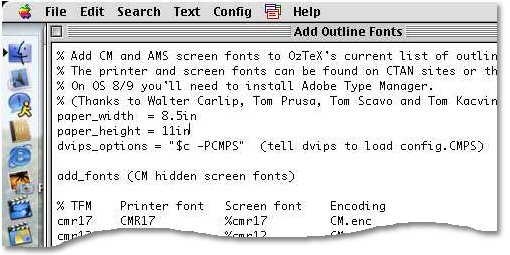
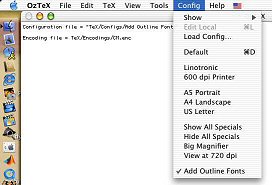
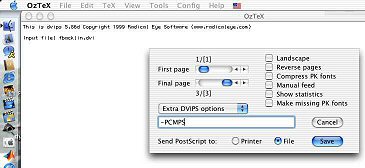
Using OzTeX (Mac)
|
||||||||||||||||||
| Should I use dvips/ghostscript/distiller combination, PDFLaTeX or dvipdfm? |
There are currently two viable alternatives in producing compliant PDF documents from LaTeX (the dvips method and
the pdfTeX Method).
The first option is currently the best one owing to the fact that the LaTeX source file does not have to be modified,
all style and class files are supported, and bitmapped as well as postscript figures can be included directly into the final PDF.
Both methods of creating compliant PDFs work well.
However the work flow and requirements are slightly different.
Of course, they all require that the TeX installation being used supports Type 1 fonts.
Dvipdfm generally works well, but has some bugs in processing certain types of .eps figures. The only reliable way to work with dvipdfm when including encapsulated postscript figures in your document is to first convert them to PDF. |
||||||||||||||||||
| My TeX installation uses bitmapped fonts, what should I do? |
All earlier TeX/LaTeX installations used METAFONT technology to create Type 3 fonts.
These fonts were customized for the printing device for which they were meant.
Unfortunately that does not help in the creation of PDF that renders well on the screen as well as
in print.
If you have the (La)TeX system installed on your own computer, upgrade it to a newer version.
Most newer packaged distributions come with Type 1 fonts.
All packages mentioned above support Type 1 fonts.
If you are using a network installation of LaTeX, please request
your system administrator to upgrade the installation with a
more recent distribution. Unfortunately, there is no reliable
way to convert fonts from bitmapped to vector once the document has been generated.
The changes have to be made when converting from latex --> dvi --> PDF. |
||||||||||||||||||
| I am using vector fonts, yet the PDF test says there are bitmap fonts in my paper. What should I do? |
It may happen that even if your installation uses Type 1 fonts only your pdf document still contains bitmapped (Type 3) fonts.
The most likely source for bitmapped fonts are images that might be using bitmapped fonts.
You may check if these fonts originate from the graphics in the document by compiling the source file without the graphics. The solution will be either to regenerate the offending images using Type 1 fonts or to convert them to raster images such as JPEG or PNG.. |
||||||||||||||||||
 Under Windows with MikTeX and Ghostscript the third line